
Settings
The plugin settings live at Settings > Agent to Bricks in the WordPress admin. The settings page manages CLI & Agent API Keys. This is where you generate and revoke keys for external tools. See Authentication for the details.
If the settings menu item is missing
Section titled “If the settings menu item is missing”If you activate the plugin and do not see Settings > Agent to Bricks in the WordPress sidebar, use one of these direct paths instead:
- Go to Plugins > Installed Plugins and click the Settings link under Agent to Bricks
- Open the settings page directly at
/wp-admin/admin.php?page=agent-bricks-settings - Use the short help URL: agenttobricks.com/menu-missing
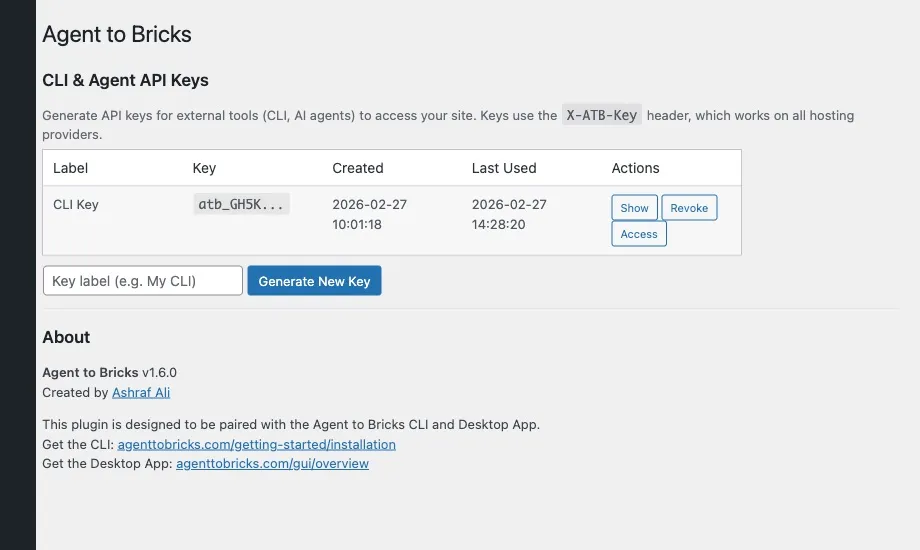
If you land on the screen above, you are on the right page. Generate your API key there and continue with Authentication or the Installation guide.
wp_options keys
Section titled “wp_options keys”The plugin stores its data in several WordPress options. You shouldn’t need to edit these directly, but they’re useful for debugging or if you’re building integrations.
agent_bricks_settings
Section titled “agent_bricks_settings”Main settings object. Currently stores general plugin configuration.
agent_bricks_api_keys
Section titled “agent_bricks_api_keys”Array of CLI/agent API keys. Each entry:
[ 'key_hash' => '...', // SHA-256 hash of the key 'key_prefix' => 'atb_xK9m', // First 8 chars (for display) 'user_id' => 1, // WordPress user who created it 'label' => 'My CLI', // Human-readable label 'created' => '2026-02-25 14:00', // Creation timestamp 'last_used' => '2026-02-25 15:30', // Last API request timestamp]bricks_global_classes
Section titled “bricks_global_classes”Bricks’ native option. Array of global CSS classes. The plugin reads and writes to this for class management. See Global classes.
bricks_theme_styles
Section titled “bricks_theme_styles”Bricks’ native option. Theme style definitions including typography, colors, and custom CSS. The plugin reads this for the /styles endpoint.
bricks_global_settings
Section titled “bricks_global_settings”Bricks’ native option. Contains the color palette and other global Bricks settings. Read-only from the plugin’s perspective.
bricks_custom_properties
Section titled “bricks_custom_properties”Bricks’ native option. CSS custom properties defined through the Bricks UI.
automatic_css_settings
Section titled “automatic_css_settings”ACSS’s native option. Read by the plugin for framework detection and design token extraction. Only present if ACSS is installed.
Resetting settings
Section titled “Resetting settings”To start fresh, delete the options:
DELETE FROM wp_options WHERE option_name IN ( 'agent_bricks_settings', 'agent_bricks_api_keys');Or from WP-CLI:
wp option delete agent_bricks_settingswp option delete agent_bricks_api_keysThis removes all plugin configuration and revokes all API keys. The Bricks-native options (bricks_global_classes, etc.) are untouched.
Environment-specific configuration
Section titled “Environment-specific configuration”If you manage staging and production environments, remember:
- API keys are per-site. A key generated on staging won’t work on production.
- The CLI config file supports multiple sites. Set up site profiles in
~/.agent-to-bricks/config.yamlso you can target different environments without changing settings. See Configuration.